
When a smart home misbehaves in Lagos, the first complaint is almost always “the Wi-Fi is bad.” Sometimes that is true. Often the problem is deeper: no dedicated network design, consumer-grade switching, overloaded wireless, and IoT devices competing with 4K streaming on the same flat network.
Automation, AV, cameras, and voice control all depend on the network. Treating it as an afterthought — or as “the ISP router in the hallway” — is one of the most expensive mistakes in premium residential projects.
What a Smart Home Puts on the Network
Even a mid-sized Lagos residence may simultaneously carry:
- Multiple 4K or HDR video streams
- Whole-home audio with synchronized zones
- IP cameras and door stations
- Lighting and shading controllers
- Climate and energy monitoring
- Staff and guest devices on overlapping coverage
Each category has different bandwidth, latency, and security needs. A single wireless network with default settings will eventually buckle — usually when the home is fully occupied, not during the demo.
Structured Cabling Still Wins
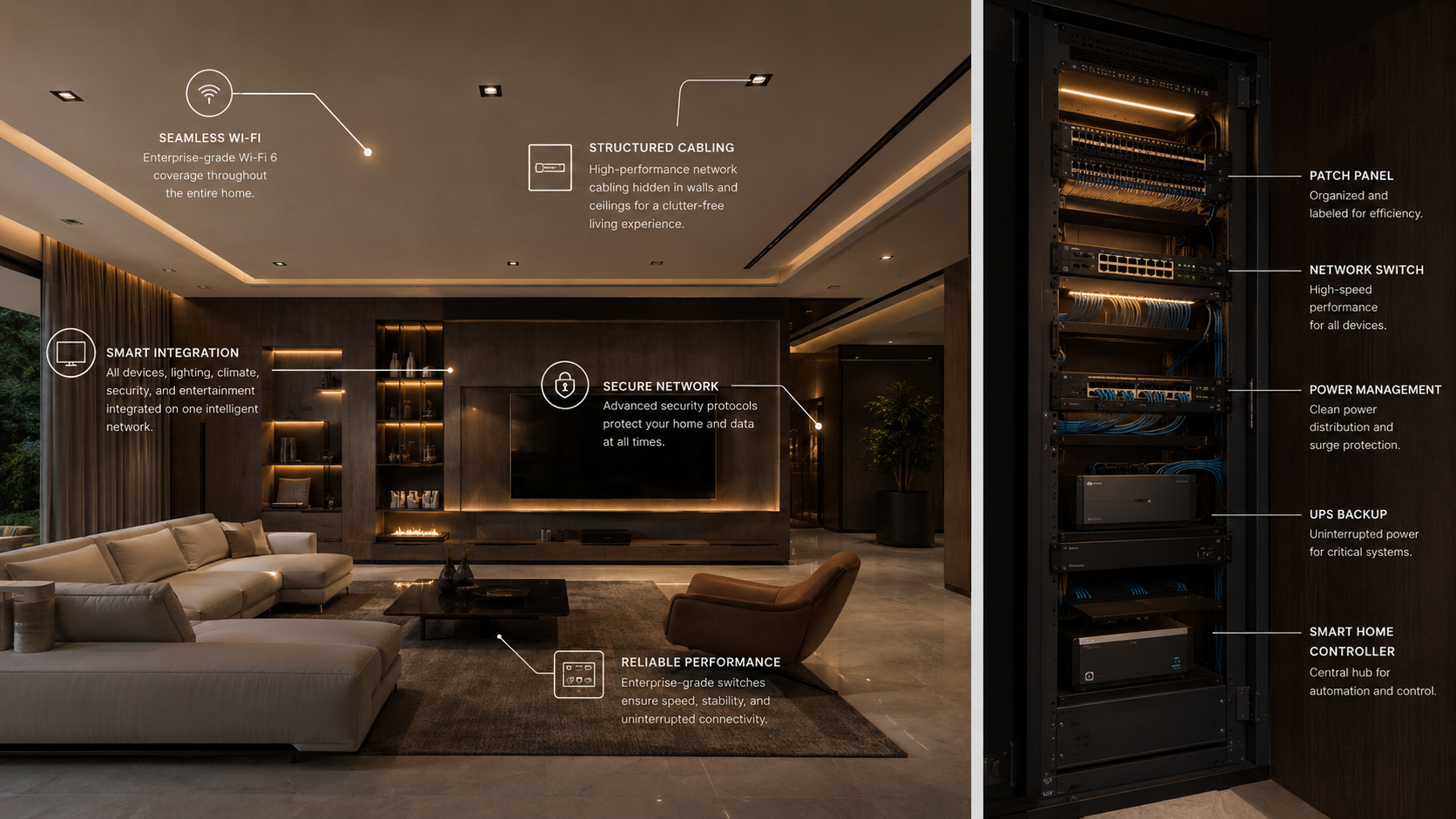
Wireless is for mobility. Fixed devices should be wired wherever possible:
- TVs and streamers
- Desktop racks and amplifiers
- Access points themselves (wired backhaul)
- Cameras at perimeter locations
- Control processors and key automation hubs
Cat6 or better homerun cabling to a central comms location gives you predictable performance and simplifies troubleshooting. In new Lagos builds, conduit and data paths should be specified alongside electrical — not added after tiling.
Wireless Done Properly: Access Points, Not Extenders
Mesh kits and repeaters are acceptable in small spaces. In large Lekki or Mainland estates with thick walls, multiple floors, and outdoor areas, design matters:
- Access point placement — centred on usage zones, not only where cable was easy.
- Separate SSIDs or VLANs — isolate IoT and staff devices from owner laptops and control systems where appropriate.
- Channel planning — dense neighbourhoods mean interference; professional surveys beat guesswork.
- Capacity — device count grows for years after move-in; headroom prevents constant replacements.
Security and Segmentation
Smart homes are attractive targets when cameras, NVRs, and control systems sit on the same open LAN as guest Wi-Fi.
Minimum good practice:
- Separate VLANs or networks for IoT, AV, security, and guests
- Strong admin credentials changed from defaults
- Remote access via secure methods — not port-forwarding random devices
- Regular firmware updates on switches, APs, and key controllers
Your integrator should document IP ranges, device lists, and recovery procedures — not leave you with a sticky note and one shared password.
Power and Uptime in Nigeria
Network reliability is also power reliability:
- UPS on core switch, router, and primary access points
- Conditioning on sensitive gear
- Ventilated rack or closet — overheating shortens life of switches and NVRs
- Generator transfer considerations — some gear needs graceful reboot sequencing
When the network drops, “smart” homes feel very dumb: shades stall, apps spin, cameras go offline, and staff revert to manual workarounds.
Signs Your Network Is the Bottleneck
- 4K content buffers while fewer devices are active than you expect
- Cameras drop offline under load
- Automation responds in seconds instead of instantly
- You have added three mesh nodes and performance is still uneven
- Different integrators each added their own switch in different closets
These symptoms often appear months after handover — when the home is fully furnished and occupied.
Design Checklist Before Handover
- Central comms location with cooling and power plan
- Wired homeruns documented and labelled
- Business-grade switching with documented port map
- Access points sized for coverage and device count
- IoT and guest segmentation policy
- Backup internet path considered for critical monitoring (where budget allows)
- As-built network diagram delivered to the owner
How Networking Fits the Bigger Picture
Networking is the foundation for automation and AV — not a separate “IT guy” task. When GEEP Engineering designs whole-home systems in Lagos, the network plan is developed alongside lighting, shading, cinema, and audio so control traffic and media streams coexist without constant firefighting.
For broader automation planning, see Smart Home Automation in New Builds vs Renovations. For cloud monitoring of AV estates, see The Rise of Cloud-Based AV Management.
Next Step
Upgrading network infrastructure before adding more smart devices often costs less than replacing a patchwork later.
Contact GEEP Engineering via the contact page or email hello@geepengineering.com for a site review or new-build coordination.